
Integrated platform
Apple controls the hardware, operating system and silicon roadmap. That produces a coherent experience for people already using iPhone, iPad and Apple services.


Jump-IT Comparison · 2026 market analysis
Mac adoption is growing, Windows has lost its old monopoly, and a memory-supply shock is pushing computer prices upwards. Yet crucial Windows applications have not disappeared. The practical answer may be a Mac for everyday work and Windows on demand through Jump‑Desk.

The short answer
Apple is winning more PC buyers, but Windows remains the largest measured desktop platform and a practical requirement for important applications, workplace systems and specialist tools.
The shift is from one operating system for everything to a mixed-device world. You can prefer macOS for the computer in front of you and still need a genuine Windows desktop for Power BI Desktop, Visual Studio, administration, testing or a vendor-specific application.
That is where Jump‑IT is valuable: Jump‑Desk adds a separate Windows 11 Pro environment without forcing a second laptop purchase or consuming the Mac’s RAM and storage with a local virtual machine. It is most persuasive for occasional, temporary or cross-device Windows access—not as a universal replacement for powerful offline Windows hardware.
Read the trend correctly
Shipments, installed devices and web usage measure different things. The defensible conclusion is that competition has intensified—not that Windows has ceased to matter.
On smaller screens, swipe sideways to compare every column.
| Signal | Current evidence | Practical meaning |
|---|---|---|
| Apple momentum | Gartner’s preliminary Q1 2026 estimates made Apple the fastest-growing major PC vendor: 6.684 million shipments, 10.6% share and 12.7% year-over-year growth. | Mac is attracting new buyers, helped in Gartner’s analysis by MacBook Neo demand and education adoption. |
| Windows scale | For July 2026, Statcounter reported Windows at 71.18% of worldwide desktop web usage, with OS X at 12.21% and macOS at 7.61%. This measures browsing activity, not the installed base. | Windows remains the largest desktop platform in that dataset, even after a long decline from its historic dominance. |
| Upgrade pressure | Normal Windows 10 support ended on 14 October 2025. Microsoft’s Windows 11 requirements include a compatible processor, UEFI Secure Boot and TPM 2.0. | Some otherwise usable PCs cannot take the standard Windows 11 path, accelerating replacement, extended-support or remote-Windows decisions. |
| Memory shock | Gartner forecasts a 130% combined increase in DRAM and SSD prices by the end of 2026 and a 17% increase in average PC prices versus 2025. | A second computer is becoming a more consequential purchase just as users are being pushed to modernise. |
Headline: “Mac is rising, so Windows is dying.”
Reality: Apple can grow quickly from a smaller base while Windows remains deeply embedded. The more useful question is no longer “Which side wins?” It is “Which environment should run each job?”
YOUR NEXT STEP
A browser-based or AI-assisted workflow can still depend on a Windows desktop application. Check the missing capability first; a separate Windows workspace may cover the exception without replacing your main computer.
Configure your Jump-Desk
Why the momentum is real
A Mac can be the more desirable primary computer without being able to replace every Windows workflow.
Apple controls the hardware, operating system and silicon roadmap. That produces a coherent experience for people already using iPhone, iPad and Apple services.
M-series Macs combine strong everyday performance with efficient mobile designs. They have changed expectations around battery life, noise and portability without requiring users to manage PC components.
Gartner specifically linked Apple’s Q1 2026 growth to robust demand for MacBook Neo, which brought new users into the Mac ecosystem and gained education traction.
macOS is a natural home for Apple-platform development and a popular Unix-based environment for web, creative and knowledge work. For these users, Windows may be a secondary requirement rather than the default desktop.
Important context: Gartner’s 10.6% figure is quarterly worldwide PC shipment share, while Statcounter measures browsing activity. Neither alone proves how many active computers run each operating system.
The software reality
Many common jobs have excellent Mac or browser alternatives. The remaining Windows requirement is narrower than it once was—but often too important to ignore.
On smaller screens, swipe sideways to compare every column.
| Task or application | Windows position | What a Mac user should know |
|---|---|---|
| Power BI Desktop | Windows required | Microsoft’s current requirements list Windows; the browser service does not reproduce every authoring workflow. Its Microsoft’s virtualisation support guidance supports Azure Virtual Desktop and Windows 365 and excludes other VDI. This is not a supported-Jump-IT recommendation. |
| Visual Studio | Full IDE on Windows | Microsoft retired Visual Studio for Mac on 31 August 2024 and points Mac users to Visual Studio on Windows or Visual Studio Code on Mac. VS Code is excellent, but it is a different product. |
| Windows administration | Often best on Windows | PowerShell, Group Policy, Windows testing and organisation-specific administration can require or benefit from a genuine Windows environment. |
| Industry software | Vendor-specific | Accounting, engineering, education, healthcare and line-of-business tools may support only Windows or rely on Windows drivers. Check the exact vendor requirements. |
| Microsoft 365 and browsing | Usually optional | Native Mac apps and web services cover many everyday tasks. Do not add Windows merely because the Microsoft name appears. |
| Gaming, 3D and GPU rendering | Physical Windows hardware often strongest | The current Jump‑Desk tiers do not list a dedicated GPU, so a suitable local Windows machine is the honest recommendation for GPU-dependent work. |
Most Mac users do not need Windows all day. They need it when one application, client, test environment or operational process demands it. That makes access and duration more important than brand loyalty.
A legacy PC may still switch on, but normal security updates ended in October 2025. Keeping an unsupported machine as the “Windows box in the cupboard” is not a durable business strategy.

The 2026 hardware squeeze
AI-infrastructure demand has tightened memory supply. That matters because DRAM and NAND are not optional extras: they are core components in every modern laptop.

These are forecasts, contract-market observations and models—not a promise that every retail laptop will rise by the same amount. Existing stock, discounts, brands and configurations will vary.
Jump‑IT also depends on cloud infrastructure, so it would be misleading to claim immunity from component costs or future price changes. The real advantage is different: you can avoid funding a second physical Windows device upfront and match the commitment to Hours, Months or Years. For light or occasional Windows work, that flexibility can be more rational than buying duplicate hardware during a supply shock.
Four honest choices
The right answer depends on what must run, how often it runs, whether offline access matters and which hardware resources it needs.
On smaller screens, swipe sideways to compare every column.
| Decision factor | Mac only | Buy a Windows PC | Parallels Desktop | Jump‑Desk |
|---|---|---|---|---|
| Where Windows runs | It does not. | On separate local hardware. | In a local VM on the Mac. | On a remote Windows 11 Pro cloud VM. |
| Upfront hardware | None beyond the Mac | A second device | No second device, but the Mac must have enough resources. | No second device |
| Mac RAM and storage | Used only by macOS. | Windows uses the PC’s hardware. | The VM shares Mac CPU/RAM and uses local disk space. | Windows compute and its current 128 GB drive are remote. |
| Offline Windows | No Windows. | Yes | Yes, after setup | No; internet required |
| Apple silicon | Native macOS. | Independent architecture. | Windows 11 on Arm on M-series Macs; check app and driver compatibility. | Remote execution avoids running Windows locally on the Apple processor; check app compatibility. |
| Use from other devices | Files may sync; no Windows desktop. | Carry or separately configure the PC. | Primarily tied to that Mac. | Reconnect from supported Mac, iPad, Android, Linux or Windows clients. |
| Best frequency | No Windows requirement. | Daily, intensive or offline Windows work. | Frequent local Windows work on a well-specified Mac. | Occasional, temporary, mobile or separated Windows work. |
| Main compromise | Cannot run required Windows-only software. | Purchase, maintain and carry another computer. | Consumes local resources and has Windows-on-Arm compatibility considerations. | Depends on connection quality and current tiers do not list a dedicated GPU. |
For a deeper local-versus-cloud comparison, read Jump‑Desk vs Parallels Desktop.
The bridge between platforms
Jump‑Desk is a persistent Windows 11 Pro cloud PC. It does not turn macOS into Windows; it gives the Mac a connection to a separate Windows computer.
For the Mac-specific commercial use case, see Windows Cloud PC for Mac Users. For setup, follow How to Run Windows on a Mac Without Buying a PC.
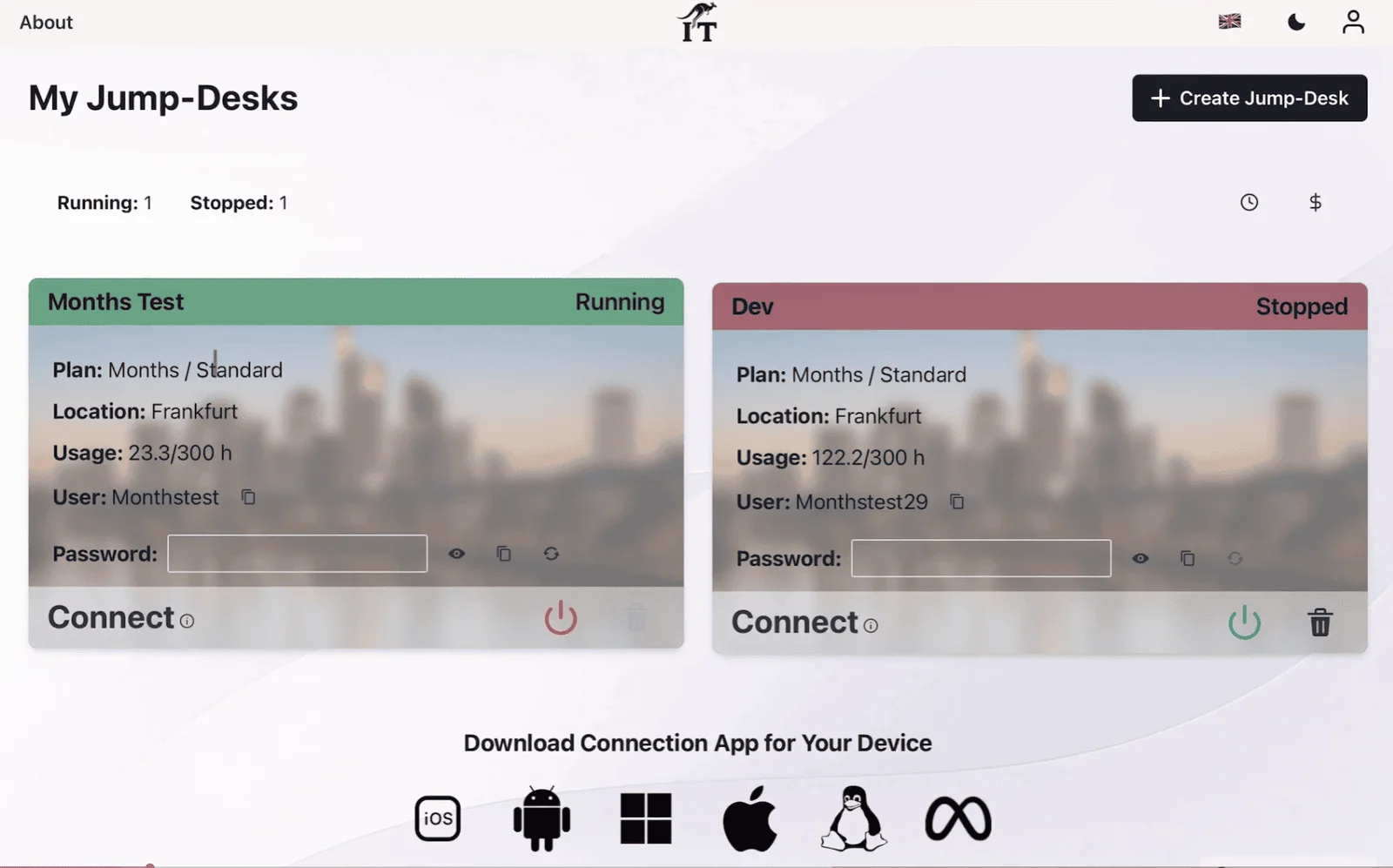
Repository-verified configuration
Current tier definitions include Windows 11 Pro and 100 GB transfer. Prices are loaded by the live creation flow for the selected region, tier and duration, so this page does not present one hard-coded figure as universal.
For lighter compatible Windows work.
For more responsive everyday Windows use.
For heavier compatible multitasking.
Choose a geographically appropriate region and test the real network path. A nearby region can help latency, but it does not guarantee a specific experience because the device, local network, ISP and application also matter.
A decision, not a slogan
The strongest Jump‑IT case is not “never buy a PC.” It is “do not buy a second PC until your Windows requirement proves that dedicated hardware is the better tool.”
Direct answers
No. Apple is growing and Windows no longer has its old near-monopoly, but current shipment and web-usage evidence does not show Windows disappearing. Windows remains important for many business, technical and specialist applications. The more accurate trend is a mixed-device market in which people may prefer a Mac while still needing access to Windows.
Mac is gaining users, but it is not replacing Windows across the whole market. Gartner’s preliminary estimates placed Apple at 10.6% of worldwide PC shipments in the first quarter of 2026, despite Apple being the fastest-growing major vendor in that quarter. Shipment share and operating-system web usage are different measures, so they should not be treated as interchangeable.
A Mac user may still need Windows for Power BI Desktop, the full Visual Studio IDE, Windows administration tools, an employer-specific workflow or specialist software and peripherals whose vendor only supports Windows. Microsoft retired Visual Studio for Mac in 2024, while Power BI Desktop currently lists Windows as a requirement. Windows compatibility alone does not establish support for a particular cloud host; apply the Power BI support boundary above before selecting one.
No. Gartner’s 17% figure is a forecast for average PC prices in 2026 compared with 2025, not a guaranteed increase for every model. Brand, configuration, inventory and timing still matter. TrendForce has also reported steep contract-price increases for DRAM and NAND, which supports the broader risk of higher memory and storage costs.
It can for compatible, internet-connected Windows work that fits the selected Jump‑Desk tier. It is particularly attractive for occasional access, temporary projects and one Windows-only application. A physical Windows PC remains better for offline work, dedicated-GPU workloads, specialist local hardware or consistently latency-sensitive use.
No. Jump‑Desk runs Windows 11 Pro on a remote cloud virtual machine. The Mac displays and controls that machine through a remote connection, so Windows does not reserve the Mac’s RAM or create a large local virtual-machine disk.
Parallels Desktop runs a Windows virtual machine locally on the Mac and can support offline use after setup. Jump‑Desk runs Windows remotely, separates Windows compute and storage from the Mac and can be reached from multiple supported devices. The better choice depends on internet access, application compatibility, local Mac resources and usage frequency.
No. Jump‑Desk is a cloud PC and needs a suitable internet connection. If offline Windows is essential, use a physical Windows PC or a compatible local virtualisation product.
Standard provides 2 vCPU, 4 GB RAM and a 128 GB HDD for lighter work. Pro provides 2 vCPU, 8 GB RAM and a 128 GB SSD for more responsive general work. Pro+ provides 4 vCPU, 16 GB RAM and a 128 GB Premium SSD for heavier compatible multitasking. Check the live regional price and the application’s own requirements before buying.
Buy a Windows PC when Windows is the main daily environment, internet access is unreliable, a dedicated GPU or specialist peripheral is required, local latency matters or the long-term total cost is lower than maintaining a cloud desktop. Jump‑Desk is strongest when Windows is necessary but a second physical machine is not.
Evidence and media
SEE THE PRODUCT IN ACTION
These recordings show the current Jump-IT interface with demonstration data. Use the controls to pause, replay or view a recording full screen.
Name your desktop, choose a region and plan, and review the configuration before checkout.
Find the display settings, adapt the connection to your screen, and download the connection file.
CURRENT WORKFLOWS · SEPTEMBER 2026
A mixed-device workflow often starts with one practical requirement: a client’s desktop tool, an Access database or an Excel add-in. Check the exact application, plug-ins, drivers, licence and vendor-supported hosting environment before choosing where Windows runs. A familiar file format does not guarantee that the Mac or browser edition includes every feature. Power BI Desktop has a separate virtualisation support boundary; read the supported-environment guidance before choosing a cloud desktop.
For a Mac-first business, Jump-Teams extends that decision to the people doing the work. Pilot one representative application, invite a colleague through their own account and assign a desktop with the resources they need. Keep the Mac for everyday work and use the retained Windows workspace for the exception.
Read the business guide to invitations, roles, funding and desktop assignments.
Explore Jump-Teams →Follow a practical onboarding checklist, from a first pilot to reviewing access when a role changes.
Read the team onboarding guide →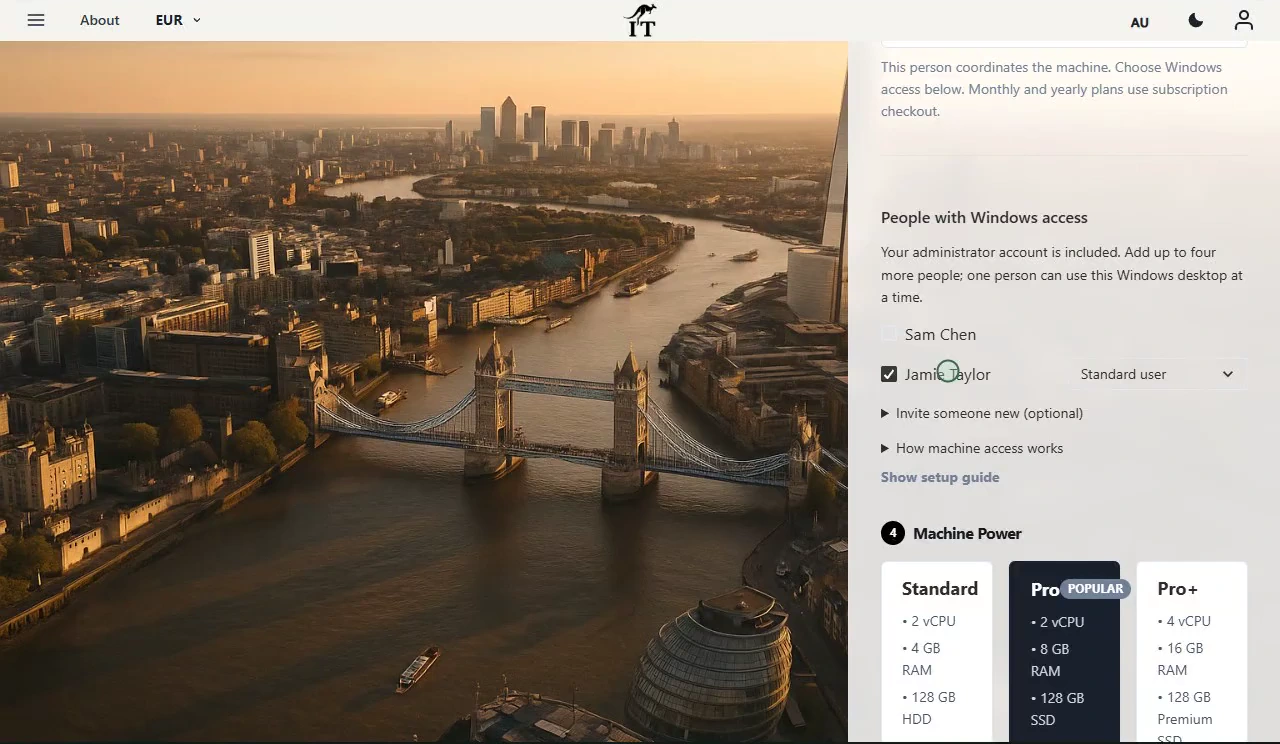
Eligible Hours desktops use prepaid funding. Compute charges apply while running, and the separate service charge continues while the desktop is retained. Stopping the desktop preserves its files and ends running compute charges; deleting it permanently removes the desktop. Review the wallet, current rates and funding permissions in Jump-IT before creating one.
For regular work, Months includes up to 300 hours of uptime per desktop each month. Review the current Years option when a longer commitment suits the requirement. Each desktop has its own plan, region and performance tier.
Compare current plans →Use the right operating system for each job
Keep macOS as the everyday environment, then create a Jump‑Desk when a compatible Windows application, project or client genuinely needs Windows 11 Pro. Check the live regional total before deciding whether cloud access, Parallels or physical Windows hardware offers the best value for your pattern of use.
The touchscreen MacBook Pro guide and Surface Laptop Ultra review roundup compare current local-development choices alongside cloud Windows team work. The decision includes software compatibility, input, memory, price and the job’s acceptance result. A launch, benchmark or touchscreen does not establish that one operating system has replaced the other.
Related device guidance added 31 October 2026.
